
Music map app recommendations: 5 ways to connect songs with places
Looking for a music map app that connects songs with the streets you know? Spotify and Apple Music are built around playlists, while map apps focus on navigation and place information. jeojeo connects songs, places, routes and exploration, so putting a song on a map becomes something people can discover and share. Here are five adjacent product ideas and the different use cases they suggest.
Why use a music map app? The gap between playlists and maps
Spotify and Apple Music are excellent for searching, playlists and recommendations, but their core question is what to play. Google Maps and Apple Maps are built for navigation, place information and saved locations, so their core question is where to go.
If you want to leave a song at a street corner or let people entering an area discover a set of songs, there is a gap between the two types of app. jeojeo starts there by letting songs live in places, connect into routes and become something others can explore.
1. SoundMap: a map for personal listening memories
Introduction
SoundMap connects with Apple Music or Spotify and lets people place meaningful songs at locations they have listened in, creating a personal music map. It is easy to understand if you want a song to stay with a memory of a place.
The public listing currently presents it mainly as an iPhone product, with a relatively small update and review footprint. For listeners who like saving moments through music, it is an interesting direction.
Pros and cons
| Pros |
|
|---|---|
| Cons and limitations |
|
Who is SoundMap for?
It suits people who want to attach a song to a trip, café or everyday street and keep a listening memory that moves with their life.
2. MySoundtrack: a reminder when you arrive

Introduction
MySoundtrack! lets users choose home, school, work or another location, receive a notification on arrival, and then open selected Apple Music, Spotify, YouTube or YouTube Music content.
It is a simple way to attach a private listening cue to a familiar place. The idea works well for small rituals: one song for arriving at work, another for starting a walk and something calmer for coming home.
Pros and cons
| Pros |
|
|---|---|
| Cons and limitations |
|
Who is MySoundtrack for?
It suits people who like giving their day a small rhythm: an energising song when they arrive at work, then something calmer when they get home.
3. Around Music: discover what is playing nearby

Introduction
Around Music focuses on discovering what people nearby are listening to. Its Music Radar presents nearby listeners through album art and can create an Around You Mix based on location.
The fun is the feeling of musical coincidence: a café, subway or park becomes a place where you might discover something unexpected. It is currently presented as an iPhone and Apple Music focused experience.
Pros and cons
| Pros |
|
|---|---|
| Cons and limitations |
|
Who is Around Music for?
It suits listeners who enjoy discovering music in real time and want to open a radar at a café, on the subway or in a park to see what sound is moving nearby.
4. B-Side Map: meet a city through music history
Introduction
B-Side Map: Music Travel Guide maps studios, venues, record shops, album-cover locations, museums and landmarks, then organises curated routes. It is made for travellers who want the story behind a city’s music as they move through it.
That approach is a useful reminder that a music map can be more than a way to find songs. It can also be an invitation to walk, travel and notice the places that shaped a sound.
Pros and cons
| Pros |
|
|---|---|
| Cons and limitations |
|
Who is B-Side Map for?
It suits travellers who enjoy city stories and music history, turning a walk into a curated tour with a soundtrack.
5. jeojeo: put songs on the map and build a music route
Introduction
Some songs belong to a particular stretch of road. jeojeo is a music map app that connects songs with places, routes and exploration. Draw an area on the map and attach a song, album or playlist. Each music-linked area is a jeo, giving a familiar corner a soundtrack of its own.
Start with your journey home: upbeat songs near the station, gentler music along the river, and a familiar closing track near your door. Add the jeo you create along the way to one music map and give it a name. You now have a route shaped by your own selections.
When you enter a music area, its music joins the playback queue process. You can also explore selections left by others and discover how the same place sounds to different people. For anyone seeking a location-based playlist app, this connects everyday movement with listening.
Afterwards, Lookback lets you revisit a day’s movement and listening records. Save a map to walk again, or send its link to a friend and explain why you chose a song for that corner. A pre-concert walk or a memorable holiday alley can become part of your musical map.
jeojeo supports Spotify and Apple Music connections. Choose a service and a familiar place for your first jeo. Available playback depends on the connected service and your account plan.
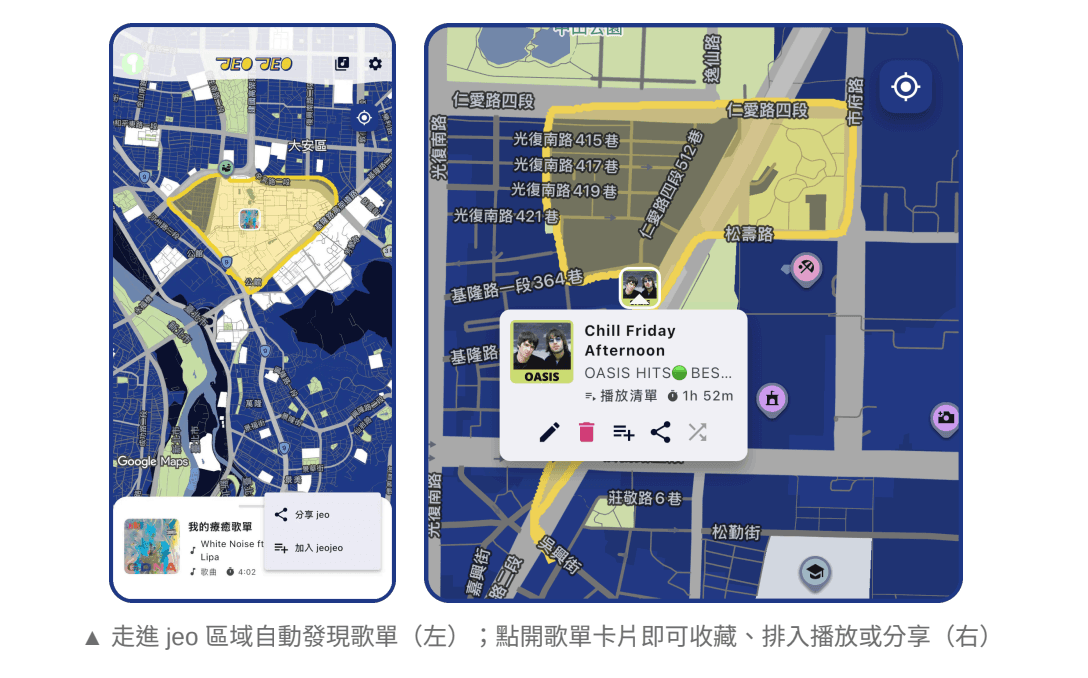
Meet the jeojeo music map in one minute
Pros and cons
| Pros |
|
|---|---|
| Cons and limitations |
|
Who is jeojeo for?
People who enjoy choosing songs for commutes, walks and trips, or sharing memories of places with friends. Start with one song for a familiar corner; your map can grow from there.
This article compares product directions and publicly described features rather than ranking paid services. Platforms, versions and features can change; check each product's official listing before using it.