
Music maps vs. regular playlists: 6 things to know
You might have a playlist you always play on your way home—and a song that always reminds you of a particular station. One brings your favourites together; the other connects music to a place. The difference between a music map and a regular playlist lies in how you organise listening, where you begin, and what you want to remember.
Regular playlists: organise a stretch of listening time
In Spotify or Apple Music, you can choose a theme, add songs and arrange a playlist. Work, Friday evenings or a holiday can all provide a reason to bring tracks together.
Songs and their order are the basic units. You can listen in sequence or use shuffle, depending on the service and plan. A playlist need not belong to a particular location: the same selection can follow you from home to work or on a trip.
A regular playlist suits sustained concentration and familiar listening. It can preserve travel memories too; the connection to a specific place usually lives in its name, description or your own recollection.
Music map playlists: give songs a place and a route
A music map playlist adds another question: where does this music belong? Ten songs might be assigned to a station, a riverside path and a street near home, then connected through a route.
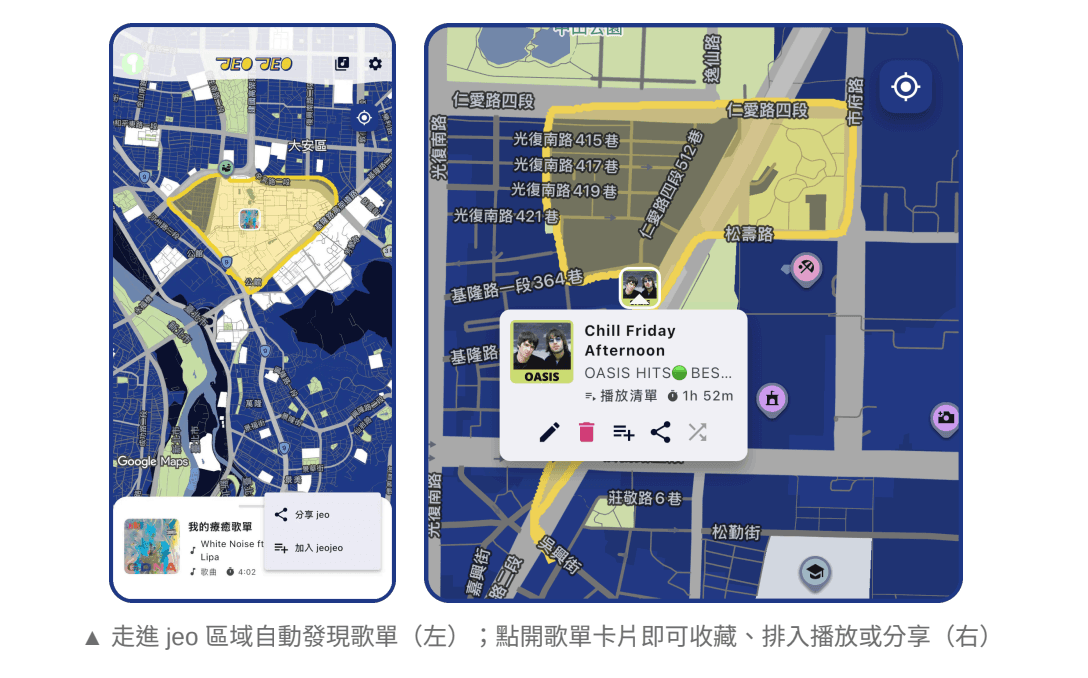
Here we focus on location-based tools such as jeojeo, where songs, albums and playlists can be linked to areas and explored as you move. Music map apps vary; location discovery and route features are not universal.
A location-based playlist gives selections context. Why this song here? Who walked with you? After a trip, you have places to revisit alongside the music you saved.
Music maps and Spotify/Apple Music playlists compared
Compare the organising unit and the listening situation. A regular playlist arranges listening over time; a music map makes places an entry point for discovery. This comparison uses standard streaming playlists and jeojeo’s area and route approach.
Two ways to organise music
| Comparison point | Regular playlist | Music map |
|---|---|---|
| Core unit | a collection of songs and their order, often grouped by theme or mood. | places, areas and routes linked to music. |
| Starting point | select it and play without visiting a specific location. | choose where to explore and discover music associated with areas you enter. |
| Sequence | song order, shuffle or other service playback modes. | places shape discovery; an area can still link to an ordered playlist. |
| What you keep | tracks, with names and descriptions for themes and memories. | music connected to specific places you can revisit. |
| Good occasions | focused work, familiar listening and continuous music on a trip. | walks, city exploration, travel and commutes with distinct stages. |
| Sharing | a selection of tracks. | selections together with their places and connecting route. |
How the same music fits into everyday life
Imagine a playlist called “Leaving work on time.” Play it all the way home, or assign parts of it to places along the way. Each approach draws attention to different details of the journey.
Commuting: give familiar stages their own mood
A regular playlist keeps a familiar flow all the way home. A music map can give the station upbeat music and the riverside something calmer, adding a location-based reason to choose a song.
Travel: a soundtrack becomes a route to revisit
A travel playlist works before departure and during long rides. Link memorable music to a café or coastal path to give yourself another way back to that moment afterwards.
Work and reading: movement is optional
A steady playlist is often all you need to focus. Music maps add the interest of places and movement, but you need not change your routine to use one: start with music for a favourite reading corner.
Build a location-based playlist with three familiar places
Begin with three familiar places that form a manageable route. Give each a short selection of music. Here is one way to try it in jeojeo.
1. Choose three places and a mood for each
Try a station, a park and a spot near home. Decide where you want energy, calm or a familiar ending before adding lots of songs.
2. Connect existing selections to places
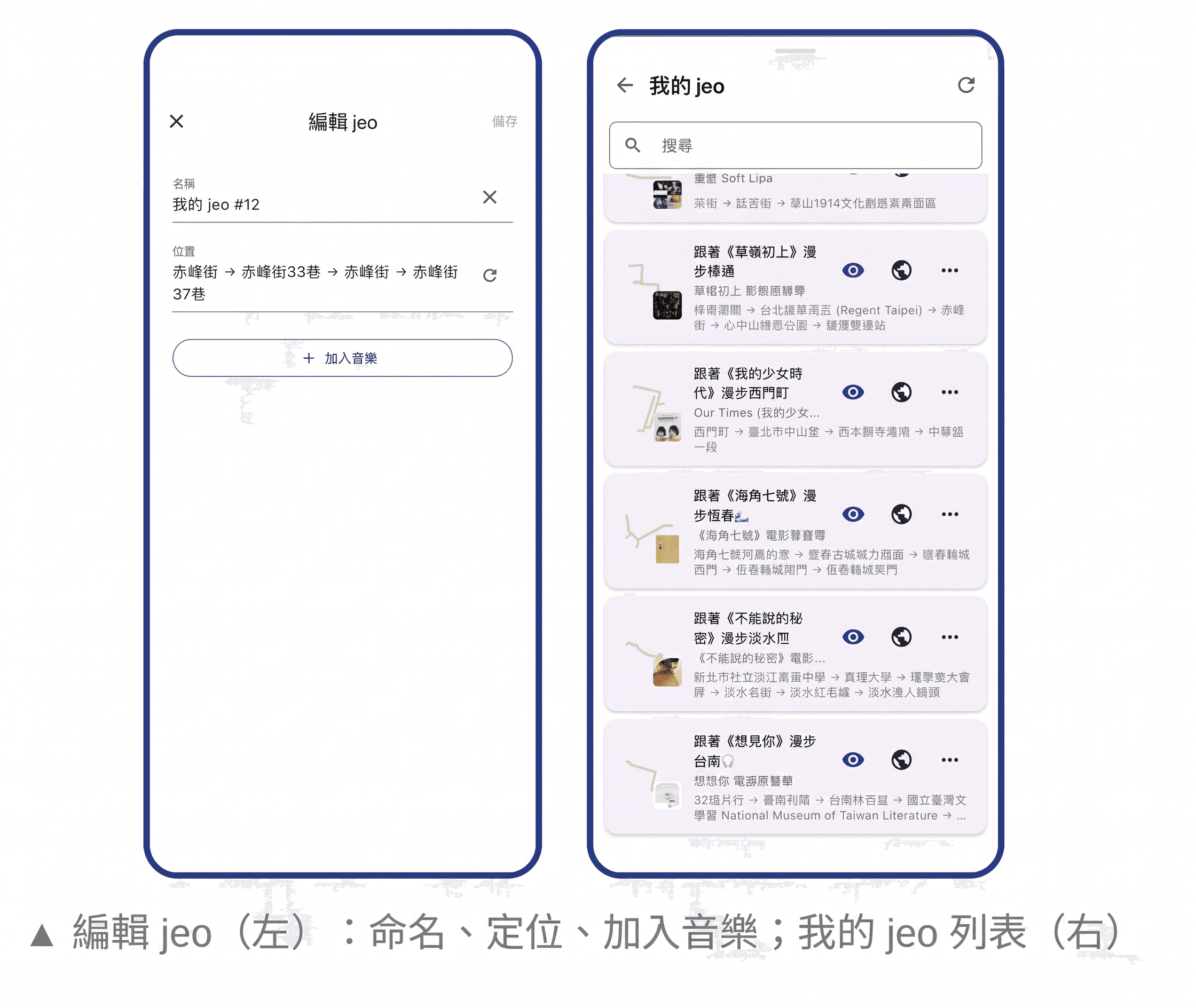
Draw an area in jeojeo, search for a song, album or playlist, then name and save the jeo. Reuse selections from Spotify or Apple Music where available through the connected service and search.
3. Join the areas and try the walk
Add the jeo along the way to one music map. Walk it once to see whether the areas and selections suit your pace, then adjust.
4. Save or share
Keep the map for another day or send its link to a friend. Talk about why you chose that place as well as why you love the music.
Keep the songs, and add a little of your life
Choose a regular playlist when you want to settle into work, reading or familiar songs. Try a music map when you want discoveries on a walk or a way to remember part of a trip.
You can keep both: organise favourites in Spotify or Apple Music and connect them with places in jeojeo. Share not only what you are listening to, but a route that says, “When you get here, this is the song I want you to hear.”