
How to Make a Travel Music Map: Pair Every Stop with a Song
Photos preserve the view, but they do not always bring back what was playing in your headphones. Pick a song for the coast, a rhythm for an old street and a sound for the city after dark. Your first travel music map can start with three stops and three songs.
What is a travel music map? Give each song a place

A regular travel playlist can play throughout a trip. A travel music map connects music with places: a station, a coastline or a viewpoint. Looking back at the map reminds you where you wanted each song to accompany you.
You do not need to soundtrack every minute. Choose three memorable stops and one song for each. Start with the scene, then add more music if you want.
Before, during and after: a simple travel music map plan
Prepare a few places before leaving so you can spend more of the trip looking around. Keep the same map and revise your song choices as the journey unfolds.
Before you leave: three places, three songs
Write down each stop, one song and a recognizable jeo name. Create the place playlists, then check that you can open them and connect your music service before setting off.
During the trip: choose a moment to listen
At a stop, open its playlist card and choose to listen. Pause for a conversation or the sounds of the street, and adjust a song only when you have stopped somewhere suitable.
After you return: keep the songs that stayed with you
Reopen the place playlists and replace any song that no longer fits. In Lookback, use the calendar or list to find the listening and movement records you want to revisit.
A three-stop travel music map you can adapt
Imagine an afternoon from a station to an old street, ending at a viewpoint. The route below is an example, not a fixed itinerary. Keep your actual transport and opening times in your travel plan, then choose music for the moments you want to keep.
Station: a song for arriving
Choose a familiar song for the start of the trip. Name the jeo after the moment, such as “First steps in this city,” and connect it to the station area you intend to visit.
Old street: music for looking around
Pick a song you want to hear while noticing shopfronts and side streets. You can pause the music to talk, order food or listen to the street. The playlist can wait while the trip unfolds.
Viewpoint: a closing track
Choose a song you would want to hear again after the trip. Later, the location playlist gives you a place to return to in your music map.
Step 1: Choose three stops and leave room for quiet
Pick three places from an itinerary you already have: a morning beach, an old street in the afternoon and a city viewpoint at dusk. Check transport, opening hours and suitable places to stop separately, using your usual map or travel tools.
Famous landmarks are optional. A breakfast spot beside your hotel, a corner where you waited for a friend or a bench before the journey home can be a stop too. Some places suit music; others are worth hearing with your headphones off.
A small checklist to keep with your itinerary
Before you leave, write one line for each stop: “Place / Song and artist / jeo name.” For example: “Station / Tycho — A Walk / First steps in this city.” Keep transport details in your usual travel plan; this short list helps you find the right music without scrolling through a long playlist.
Step 2: Pair each place with one song
Write down a word for the scene: open, lively, gentle or someone you miss. Then choose a familiar song that fits. There is no need to find a universally agreed must-listen track.
The table below offers a starting point. These are subjective editorial pairings, not official destination recommendations. Swap them for your friends’ favorites and let a different person choose for each stop.
A three-stop soundtrack example
| Scene | One song to start with | Why try it |
|---|---|---|
| Morning coast | Tycho — A Walk | Spacious instrumental music for looking toward the horizon |
| Afternoon old street | Cheer Chen — 雨天的尾巴 | A light melody for lanes and an unhurried pace |
| City lights at dusk | M83 — Midnight City | Bright synthesizers to meet the city lighting up |
Step 3: Put music on your stops in jeojeo
Download jeojeo below and follow the sign-in prompts. When you are ready to listen, complete the music-service connection offered in the app. Find your first stop on the map, tap “+” and draw an area, or switch to the place-based planning option, then confirm the area.
Give the jeo a recognizable name, such as “Coast · Morning Departure.” Search for a song, album or playlist, check the artist and version, and save. Repeat for the old street and viewpoint. The three-stop beginner tutorial below explains the controls in more detail.
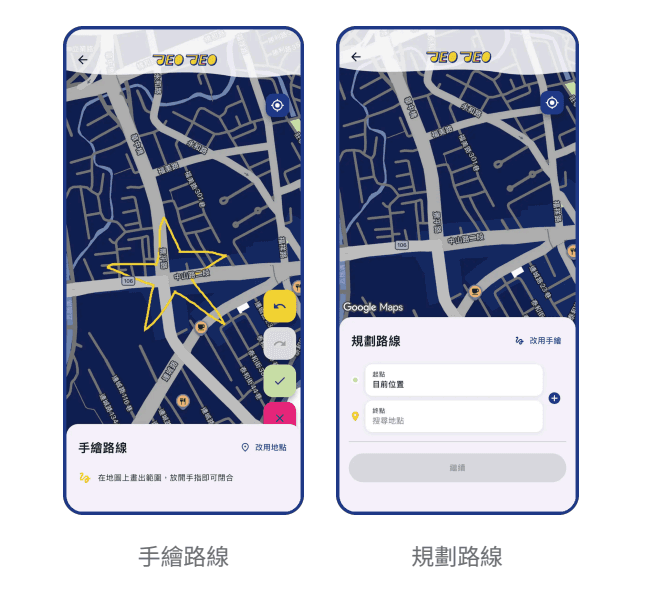
Step 4: Arrive, then choose what fits the moment
Before leaving, check location permissions, internet access and your connected music service. At a stop, view the jeo and its playlist card, then choose to listen. If the wind is loud, a street musician is playing or your friends want to talk, save the song for later.
Choosing to listen adds music to the playback queue; crossing an area boundary does not guarantee an immediate track change. Stop somewhere suitable before editing names or songs, and stay aware of traffic and sounds around you.

Step 5: Revisit the trip through its songs
After returning, open your travel music map and keep the places and songs you want to revisit. The track you planned before departure may not be the one you keep: a melody you happened to hear on the old street might capture that afternoon better.
When choosing a travel-memory app, think about how you want to return to the trip as well as how you save photos. In jeojeo, Lookback offers calendar and list views of listening and movement records. It is private by default; sharing a Lookback lets the recipient see the route and music included in that share.
Try a short review after unpacking: open the three place playlists, keep the song that best represents each stop and rename the jeos with a detail you want to remember. If you share a playlist with a friend, add the visiting order in your message so they know how you experienced the trip.
Lookback demonstration
Travel music map questions
Start with the plan you already have. These answers help you decide how much music to prepare and how to use it on the day.
Is one song per stop a limit?
No. One song keeps preparation simple. Add several songs, an album or a playlist for a longer stop, and change them after the trip if you want.
Can I prepare it before arriving?
Yes. You can organize places and songs beforehand, then listen when you arrive. Give each jeo a name you can recognize quickly on the day.
Will a song start automatically at each landmark?
At a stop, view the playlist card and choose to listen. That adds music to the playback queue; crossing an area boundary does not guarantee an immediate switch to the next song.
Can I use this on Android or iPhone?
jeojeo is available on Android and iPhone. Use the Google Play or App Store download link below, then follow the music-service connection options shown in your app.
Can I leave quiet parts in the trip?
Yes. There is no need to fill the route with sound. Pause for food, conversation, local performances or a place you want to hear as it is.
Choose one song for the first stop of your next trip
You do not need an overseas journey or an elaborate itinerary. Start with three places you want to visit and one song for each.
Which song would you leave at which place on your next trip?
The itinerary and song pairings are editorial examples, not a published travel route or turn-by-turn navigation. Screenshots show the Chinese interface; controls and available music services may vary by app version.