Spotify Wrapped 2026 and Apple Music Replay: how to find your recap
With 2026 drawing to a close, take a look at the songs and artists you listened to most before welcoming 2027. Spotify Wrapped and Apple Music Replay offer a view of your listening year. Once you find your playlist, choose a few songs to leave at places that mattered to you in jeojeo.
Is the 2026 recap available?
As checked on November 27, 2026, the official Spotify Wrapped page is still teasing the 2026 experience, with no launch date provided. Eligible Apple Music listeners can already access current-year and monthly Replay insights. These ongoing insights and playlists are separate from the full year-end recap.
Current status — November 27, 2026
Spotify Wrapped 2026: the official page is still a preview; a launch date is pending.
Apple Music Replay: eligible accounts can access current-year/monthly insights and an updating playlist; the full year-end recap is a separate release.
Where to find Spotify Wrapped
Spotify Wrapped combines a personalized annual recap with playlists. The available features depend on that year’s release and account eligibility.
For now, update Spotify and check that you are signed in to the account you normally use. Before the 2026 launch, the official page may show a preview or last year’s songs; that alone does not indicate an account problem.
For app navigation, the official 2025 instructions placed Wrapped at the top of Home in the mobile app. Treat this as a previous-year reference; the 2026 location and steps must be checked when it launches.
For a look at recent listening, find Listening stats from your profile picture in the mobile app. The questions below explain the steps. Check official announcements for annual Wrapped availability.

Can you check Apple Music Replay already?
Once you have listened enough, Replay provides current-year and monthly insights into your top songs, artists and albums. The current-year playlist keeps updating, with a fuller recap at year’s end.
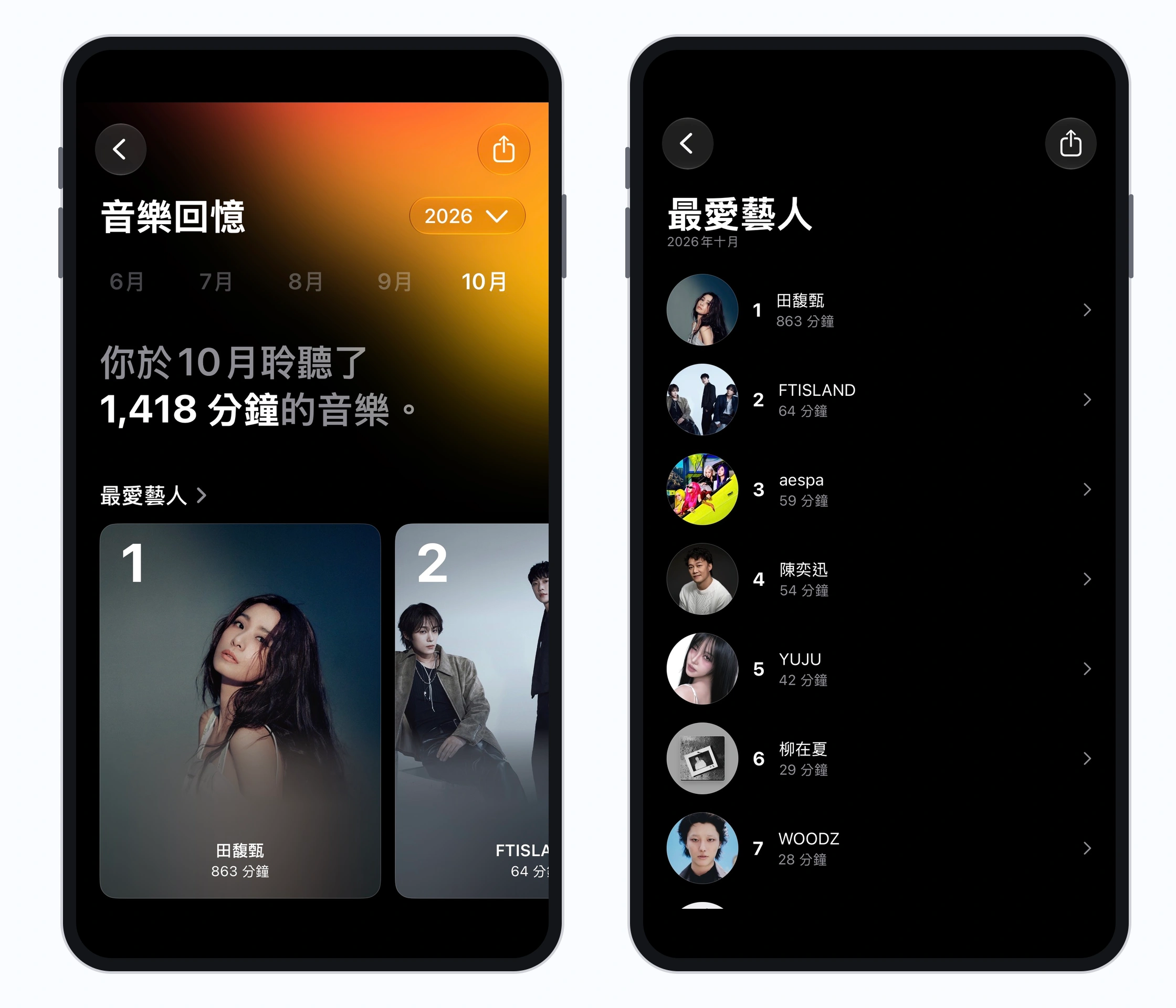
On the web, open the official Replay site and sign in with the Apple Account used for your Apple Music subscription. The results depend on the listening history available for your account.
App browsing: open Apple Music, go to Home and scroll to the bottom to find “Replay: Your Top Music.” From there, view playlists for this year or previous years and add them to your library. The screenshots show the Traditional Chinese interface.
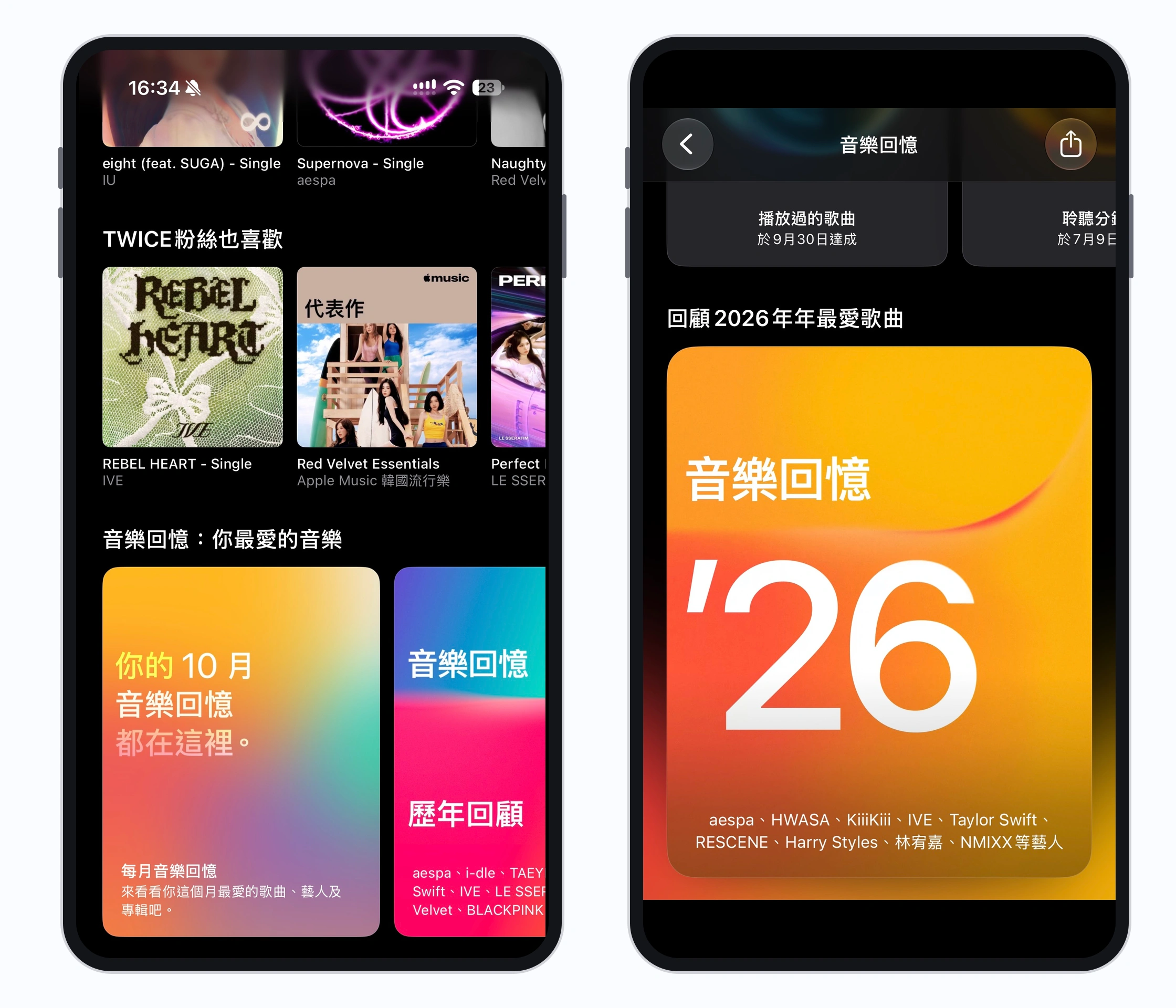
If monthly insights are missing, sign in to Replay on the web and check whether you have listened enough. Also check Use Listening History on each device.
To view listening stats in the app, open Home, find “Replay: Your Top Music” and tap “Go back in time.” You can also use the Replay website on a phone or computer. Update the app and device software if these options are missing.
Connect your songs of the year to jeojeo
Look at the songs near the top and think about where they accompanied you: your regular station, a neighborhood you visited, or a café where you met friends. Start with three songs that have a place attached.
Open jeojeo and connect a music service using the app’s prompts. Android currently uses Spotify; iPhone and iPad can connect Spotify or Apple Music. Create a jeo on the map, give the place a name, and search for the songs you chose to add.
Use your yearly playlist as a starting point, add songs to places, and build out your music map.

Try three places from your year
At your station, leave a frequent commute track in a jeo named “Where my days began in 2026.” For a café, choose a song that reminds you of a friend. For a travel neighborhood, pick the track you kept replaying on that trip.
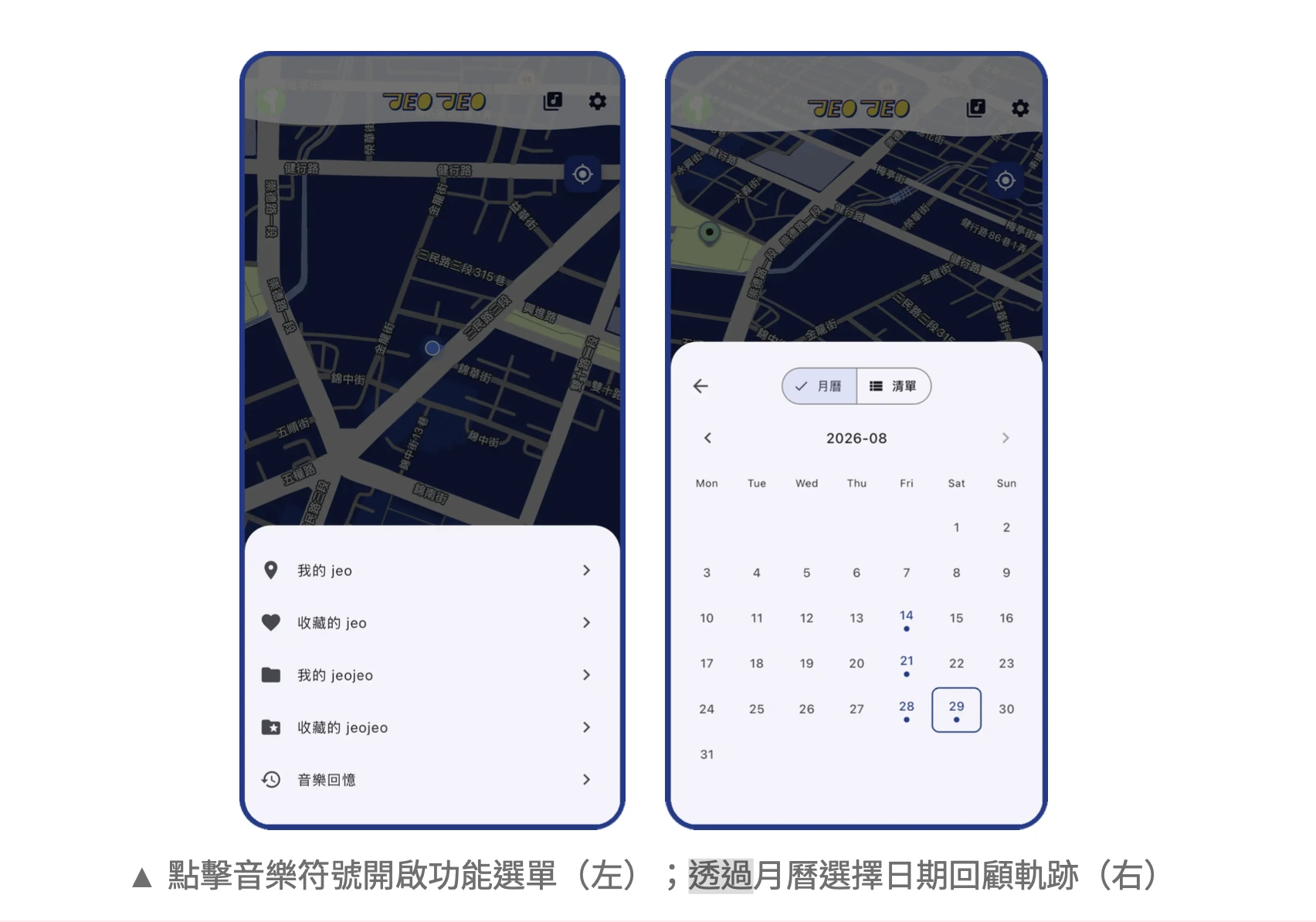
Your music map can help you remember where those songs fit into your life. To revisit saved listening and movement records, open the Lookback calendar or list.
Yearly playlist questions
Check these points if you cannot find a recap or want to add its songs to jeojeo.
When does Spotify Wrapped 2026 launch?
The official preview checked for this article does not give a date. Use the official entry point for now; the steps can be verified against the actual 2026 interface once it launches.
When does Apple Music Wrapped 2026 come out?
Apple calls its listening recap Apple Music Replay. As of November 27, 2026, the official guide explains monthly insights and the year-end recap without giving a 2026 year-end launch date. Eligible listeners can already check monthly stats and the updating Replay playlist at replay.music.apple.com.
Why does Spotify Wrapped still show my 2025 playlist?
As of November 27, 2026, the official page still links to top songs from 2025 while previewing 2026 Wrapped. Sign in to your usual account, update the mobile app and watch for the official announcement. Seeing last year’s playlist alone does not tell you whether you qualify for this year’s recap.
Does Spotify have a monthly recap? Where are listening stats?
Spotify offers Listening stats on mobile. Tap your profile picture or swipe left, then choose Listening stats to see songs and artists you have been replaying. This everyday feature is separate from annual Wrapped. Follow the labels and options available in your app.
How do monthly Apple Music Replay stats differ from the yearly playlist?
Monthly Replay shows that month’s leading songs, artists and albums. The current-year Replay playlist updates weekly for repeat listening. The full year-end Replay adds annual totals and a highlight reel. Choose a month for monthly insights, or open this year’s Replay playlist to play your frequently heard songs.
What should I check if Spotify Wrapped 2026 is missing?
As of November 27, 2026, the official page still previews 2026 Wrapped. Update the mobile app, check that you are signed in to your usual listening account and watch the official page for availability. Wrapped and some features have eligibility requirements. If it is available but missing for your account, consult Spotify’s official help.
Why can’t I see Apple Music Replay?
Check that you use the Apple Account associated with your subscription and usual listening, and that you have listened enough. Apple also recommends enabling Use Listening History on your devices.
Can jeojeo import the recap in one tap?
This guide describes choosing songs from your yearly playlist and searching for them in jeojeo to add to a jeo. Rankings, artist statistics and recap cards remain on the original service.
What to play on a festive evening walk
Keep your most-played songs for a look back at the year, and try a Christmas playlist for an evening among the lights. Pick one song for a lit-up corner, another for the tree and one for a café pause.
Heading out tonight? Use the Christmas guide’s lights, Christmas tree and café selections to choose three songs for stops along your walk.
Looking for a place to hear those songs? Our Taiwan Christmas tree guide lists event dates, lighting hours and a song for each stop. Check the organizer’s latest notice before heading out.

Save this article for this year’s recap
Check Apple Music Replay now and watch for Spotify’s official Wrapped release. When your yearly playlist arrives, return to choose a few songs and connect them to places you visited this year in your music map.
This guide will be updated with official launch information and verified steps.
- Create your first music map ↗
- Use Lookback to view and share your listening journeys ↗
- Explore Lookback ↗
- App Store download link ↗
- Google Play download link ↗