How to use jeojeo Lookback: view and share your listening journeys
Wondering where you walked last weekend or what you listened to along the way? Open Lookback in jeojeo and choose a day from the calendar or list to see available listening and movement records. Here is how to find a day, revisit its route and songs, and share a memory with a friend.
What can you see in Lookback?
Lookback places listening records and movement on a map so you can revisit a day. A familiar street corner and song title might bring back a walk, a trip, or a coffee stop after work.
The available view depends on the records saved for that date. A playlist prepared for a place and the listening and movement recorded on a particular day are separate things.
Step 1: open Lookback from the menu
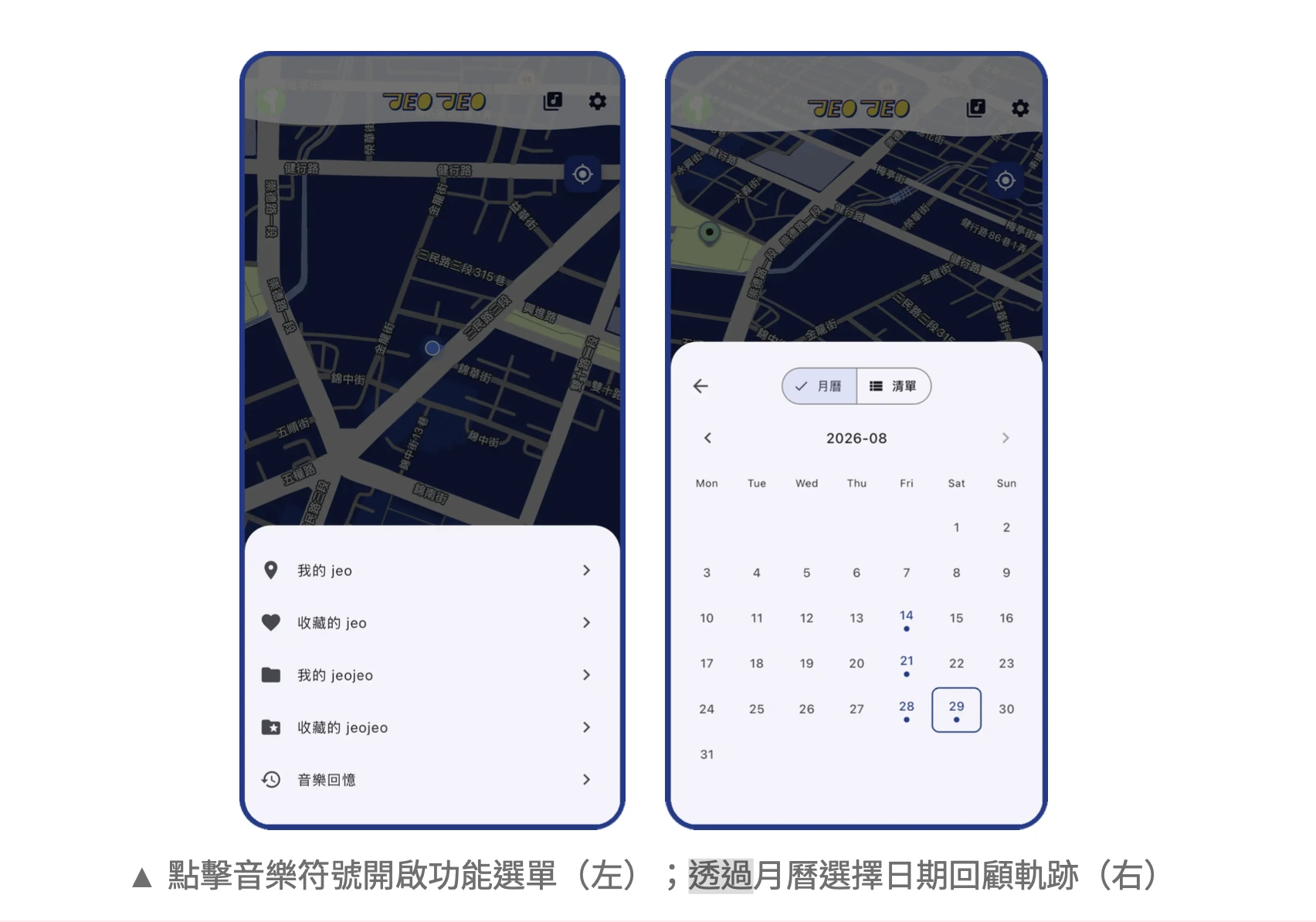
Open jeojeo and tap the music symbol at the top of the main screen to open the feature menu. Choose Lookback, then switch between the calendar and list views.
Use the calendar when you remember the date. Try the list to browse days with records. The screenshot below shows the Traditional Chinese interface.
Step 2: choose a day
Move to the month you want in the calendar and select a date with records. You can also open the list and choose the day you want to revisit.
To find last weekend’s riverside walk, start with its date, then check the route and songs to make sure you have the right day.
Step 3: revisit the route and songs
Open the day to explore its movement trace and song information on the map. The replay controls let you pause, move between records, or change your position in the replay.
Look at the route, then the song titles. Which part of the walk from the station to the river do you remember best? It is also a way to revisit small moments after a trip.
Lookback walkthrough
New: choose where your saved playlist starts
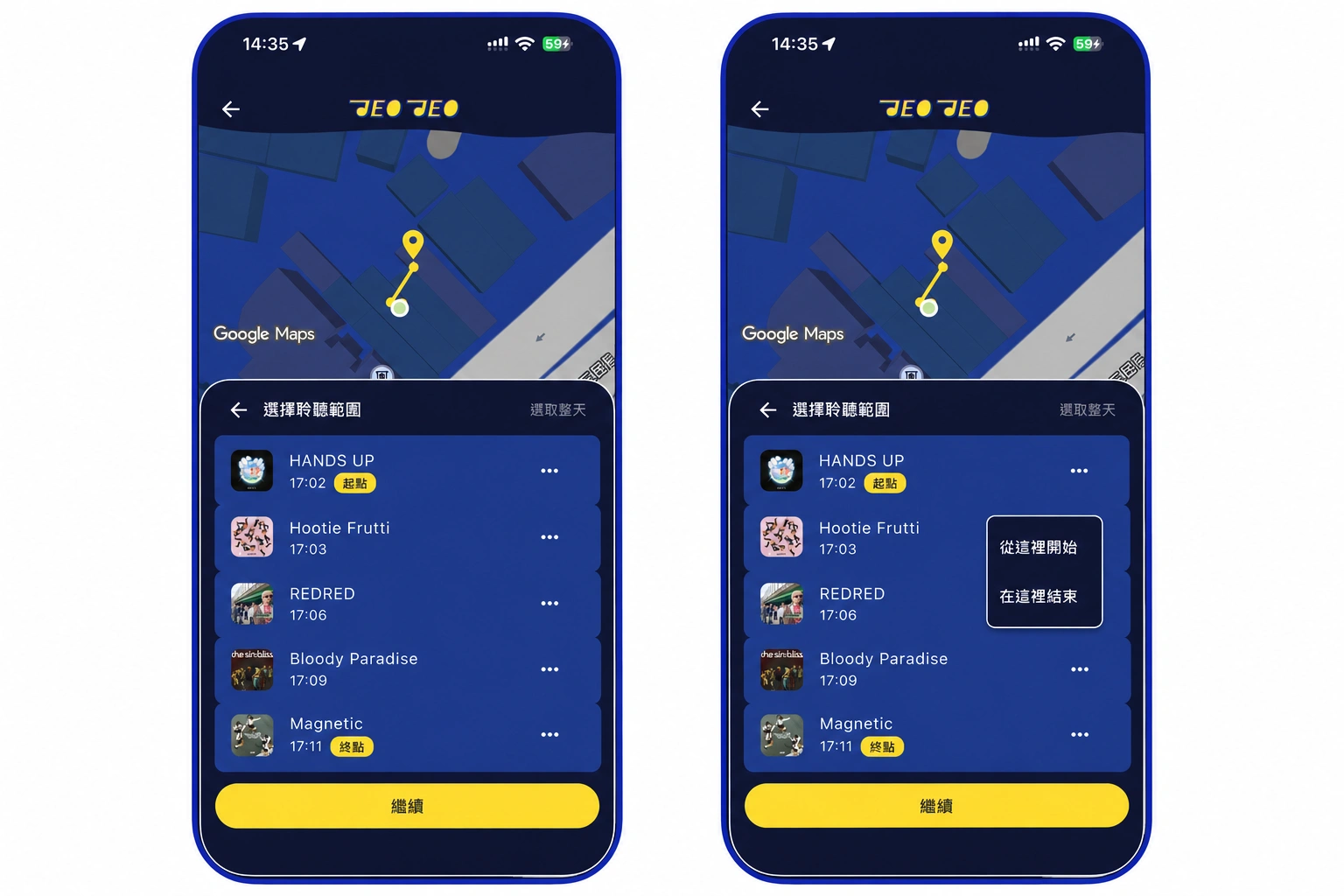
When saving a Lookback as a playlist, you can now choose which song to start with and where to finish. Select the listening range you want to keep and turn its corresponding route into a new music map.
Save part of your journey as a jeo
In the day’s Lookback, choose to save as a jeo and open the listening range selector.
Find your starting song, tap its “⋯” menu, and choose the option to start here. You can also choose where to end.
Check the start, end, and route on the map, then tap Continue and follow the prompts to finish saving the jeo. If you cannot continue with the selected range, adjust it as directed by the app.
Lookback questions
Here are a few things to check when viewing or sharing your records.
Can I save my Lookback as a playlist?
Yes. Choose to save as a jeo and select the listening range you want to keep. Its corresponding movement trace can become a new music map.
Why is there no record for a day?
Check the date and whether you used jeojeo to listen that day. Check the location permissions the app needs and your internet connection. What you can view depends on the records saved and loaded.
If you used the app but the day still will not load, report the issue with the date, time, and app version.
Can friends see my Lookback automatically?
Lookback is private by default. Recipients see the content you send when you choose to share. Check the route and music information before sending it.
Does preparing a playlist create a Lookback?
A place playlist helps you plan what to listen to and where. Lookback revisits saved listening and movement records. Preparing a playlist before a trip does not create a visit record for that day.
Start with a familiar route
The next time you take jeojeo on a walk, open Lookback afterwards to see what was recorded that day. Start with a familiar route and build a collection of days you want to revisit.
To leave a song at a particular place, continue with the music map tutorial.
- Create your first music map ↗
- Make a travel music map ↗
- Why songs bring back memories ↗
- App Store download link ↗
- Google Play download link ↗
- Find your Spotify Wrapped and Apple Music Replay yearly playlists ↗